Landscape Contractor Access
Implemented
Access to a landscape contractor so they can perform maintenance on the sprinkler heads.
-
Official comment

Hi, Jonathan
Thank you for your input.You can grant access to anyone you trust by generating a PIN code (go to Settings - System Settings - Generate Guest/Support PIN) and together with your email address used as remote access login they can control your device and they will simply set the zone that needs maintenance on the sprinkler heads as "Inactive" from its properties.
The generated PIN code availability is 24 hours from the time it was generated.
Remember that any "Inactive" zone or program can be manually started from the device itself or mobile/web RainMachine applications this way they can verify and test the sprinkler heads and when the job is done they will set the zone as "Active" and save it.
Thank you
RainMachine Support.Comment actions -

This is an inadequate solution. Among other things, my contractor doesn't want to have to call/write me for a PIN. There needs to be a control level below admin [homeowner] which gives landscapers/irrigation contractors the flexibility they need to handle basic repairs & maintenance w/o being able to delete programs, access network settings, etc.
-
My landscaper has a big, efficient crew & is on site about 20 minutes/week. I'm not about to tell him he has to walk back & forth to valve boxes--or the controller--to start/stop zones when he could do it faster from his phone. Why have a great feature set if you're not going to use it?
-

I agree with RL.
Initially I was of same mind and thought it would be much better to have a pin that was generated once so that landscaper could do their stuff. I attempted to show the guys my new awesome system and how to use it an he just stopped me, looked at me and said 'I have no need to use that" and indicated that he has all the controll he needs via direct access.
I accept though that if your landscaper also wants to manage irrigation times etc then it needs updating.
-

My landscaper needs full-time access but I don't want them having admin access to change login credentials. There needs to be a way to allow a second Remote Acess User account that is, not full administrator control. The idea of a 24 hr PIN to access is not a viable solution, my Landscaper doesn't have time to be calling every time he wants to adjust something.
-

I'm in the same boat. My HOA landscape maintenance crew can't be contacting me prior to arrival every time for a PIN. I also won't provide them with admin level access. Ideally, a revocable pin for an additional user with reduced privileges would do the trick for me. As we cover a LOT of acreage, the labor and water required for testing is sizable when they have to run back and forth to the valves. I require the ability for my landscaper to install the app on his phone and access for testing only with no configuration ability. If we're going to add/reduce runtimes, he'll tell me "more water here" and I'll take care of the configuration aspect. Most of these guys are used to tweaking runtimes often, the concept of the Rainmachine's water-need driven times is very new to them so limiting configurability is a good thing.
-
RainMachine support, its clear after my direct to support communication and the amount of interest generated here on this thread that this update should be a high priority for the next update. Please ensure this feature is given the highest priority over others for the next release.
-

In addition to the PIN method, RainMachine should have a guest login/password with limited access so landscapers can maintain the system. In my situation, the guest PIN 24-hour will not suffice as we're traveling a few days before they're winterizing (blowing out) the system. The 24-hour PIN timeout would be too short.
An easy way to manage this (for RainMachine developers) would be to allow us to create a program that we can mark as "guest accessible" which would allow the guest to start/stop that program or those individual zones. Other "non-guest" programs would not be accessible. For example, I would create a "Winterization" program which would cycle thru each zone for X (e.g. 5) minutes. The landscaper could increase/shorten individual times for the zones within that program.
I'd be happy with a guest login/password with the method I've suggested above.
-

Amen to multiple levels of permission, and persistent access. As it stands now, it is all too easy to accidentally destroy or reset the RainMachine configuration.
Though I am new to using my RainMachine, it seems that 3 or 4 levels (root/everything; configure zones/programs; run already-configured zones/programs; and perhaps notification-only) would be sufficient for most users.
Home automation controllers are parallel devices in function to the RainMachine. For example, here are the access levels that Vera provides -- they are useful:
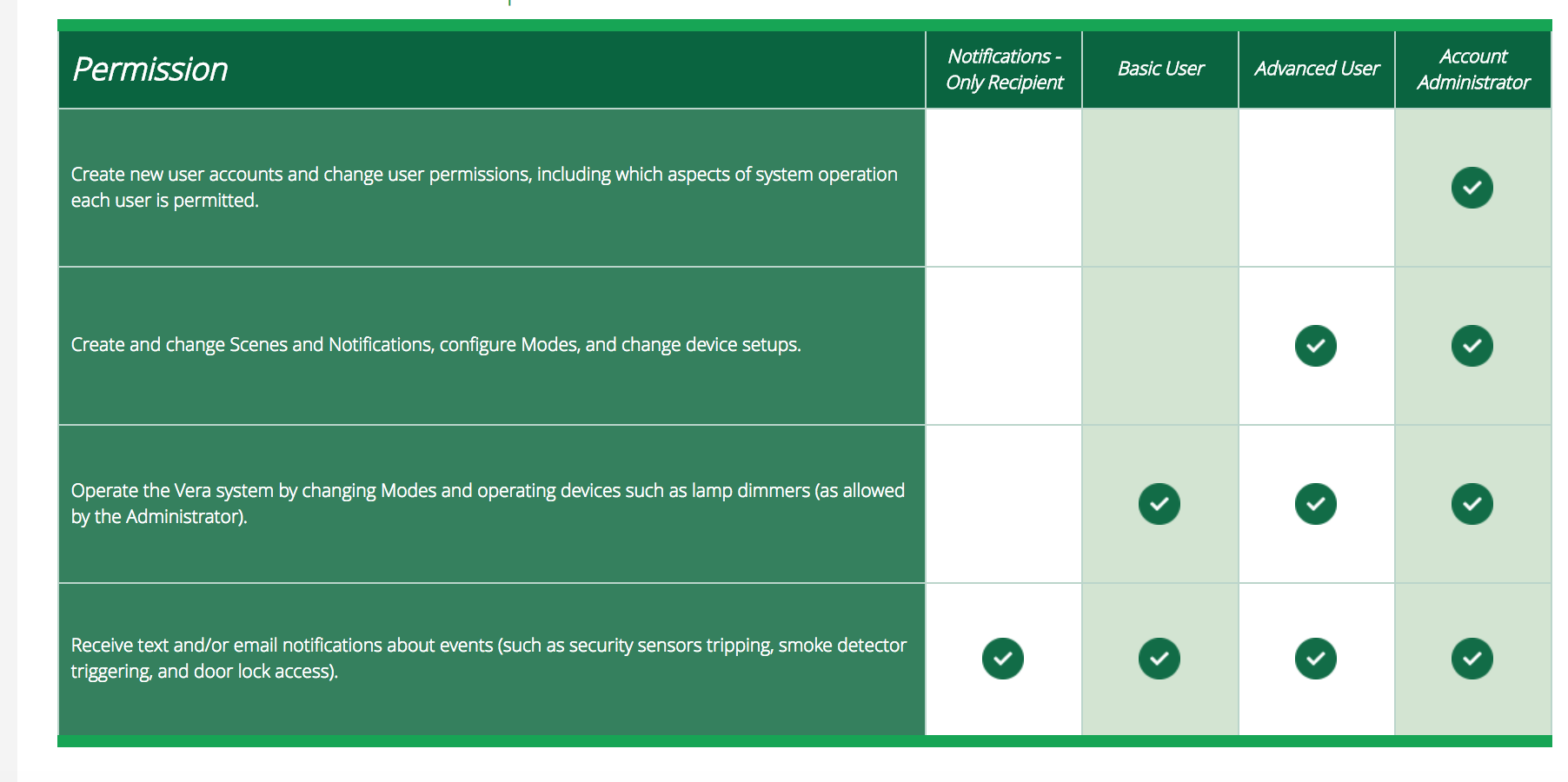 For the RainMachine, family members and day-to-day gardeners would be typically be in the "Basic User" access category, and landscape designers would have "Advanced User."
(Note that Vera provides for any number of defined users, but in practice it is rare that you would define more then one user of a given type.)
RainMachine support -- please add this missing feature ASAP. Thanks//S
-

Still no update on this. I could use this greatly as I manage multiple houses and would like to grant basic access to my tenants. Since we pay the water bill I don't want them controlling the system. I also see the huge value of being able to give it to a contractor at some point. Right now I take care of all the sprinkler stuff, but at some point I will not be doing that anymore.
-
I have been monitoring this user requested enhancement for 2 years now and no change in programming. I know of a couple people who chose another product because of this issue and the added complexity it creates with the PIN system. I hope RainMachine will expedite the code required to facilitate this enhancement ASAP.
-

Until changes are made instead of changing to a un-secure password, make it a new and secure password separate for the rest that only the 2 of you have access to.
This way your not in a "no security" environment. In most cases giving full control to landscapers remains a professional relationship.
Lets also make sure everyone is up voting the original thread, to get some more focus on this topic.
Brandon
-

It is unsecure *because* I give it to landscaper*s*. It replaced the password for other home automation services that only my wife and I know.
I really don't see a better option. Communicating a new PIN with 24h notice of each landscaper visit is unworkable both for me and for the landscapers.
-
Hi, all
Indeed, sorry about the delay in communicating about this feature implementation progress.
We are currently in "Alpha" state.
You will be able to give access to your RainMachine devices to anyone you can trust using his email address.
Once that person approves, it will get access to your RainMachine and will have the rights you select.Share access rights will be as follow:
- View Only (make no change, start no watering)
- Limited Access (no changes to your RainMachine settings, but able to start/stop zones/programs)
- Management Access (all access, but changing RainMachine password and remote access account)
You can revoke access anytime you want and the person you gave access will be able to opt out anytime they want.
Your feedback will be greatly appreciated, especially, on what type of access you would like to give on your RainMachine device.
Thank you all for your understanding and patience.
Julian
RainMachine Support -
Thanks Julian, I think most of us asking for this feature would only give our landscaper LIMITED ACCESS level permissions. The only thing your missing at this level is the ability to change zone times. A landscaper may be required to increase or decrease water amounts or frequency depending on what they see when they are on site. Anyway to add this while in ALPHA State?
-

This problem has been going on for 2 years but nothing for a basic function for service personnel.
I am winterizing my system tomorrow. The landscaper needs to control each zone as it is blown out. He has physical access to the controller but no phone app. I could not find how to turn on a zone manually from the physical controller like the landscaper would need to do. I can run my programs but that does not help the landscaper.
Do the developers not have a lawn themselves?


Please sign in to leave a comment.
Comments
38 comments