Should have just watered, but didn't. The graph shows no available water.

I have two apparent issues:
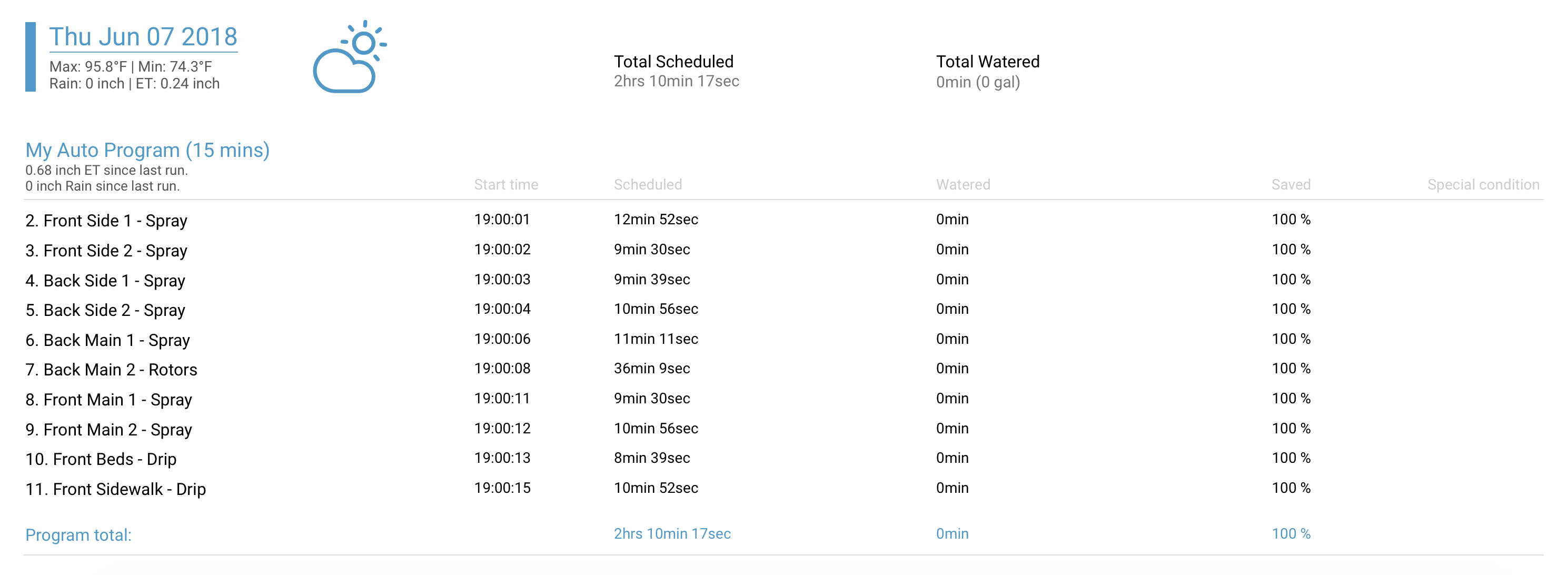
1. My schedule has my yard being watered at 7pm on Thursdays. I just checked to see how long the yard was watered and it shows 0% watering. That seemed odd, so I checked a few of the zone graphs and it's not showing that I have any available water now, or in the past several days. If there's no available water, why did the RainMachine not water my lawn this evening?
2. The app is showing that the Rain Machine is using 100% CPU. I've never seen that before. It's usually always under 10%. I don't think I've ever seen it above 10%. What's causing this?
I already hit the button to submit my diagnostics, so please let me know what's happening. Thanks!
-

The 100% CPU happens when your device simulates future irrigation. You might happen to browse exactly in this moment. As for no watering reason this can be found in Web UI at Watering Log. If it's 100% saved with no explanation means "Frequency Skip", this is an issue that we'll be releasing a fix soon.
I will also look at the logs.
-
Hi Nicholas,
Please see below:
1. 100% CPU- I just checked it again and it's still showing 100% CPU usage. I checked the log and the last line item in the log is time stamped "2018-06-08 06:53:40". It's currently 8:25 here right now, so there hasn't been anything going on, including simulation in over an hour, but the CPU is still reporting 100% usage. What else could be causing this?

2. Missed watering cycle- I checked the web UI's watering history page and it shows exactly what you mentioned. Basically 100% save with no "Special condition", which typically says "Surplus" if there's enough water in the soil and watering is not needed. This is a pretty big bug since it means the lawn is not getting watered at all and it's 100 degrees in Texas right now. I shouldn't have to manually schedule my lawn watering. That's the reason I bought the Rain Machine. When do you plan on having this fix in place and pushed live?
-
The fix is only for reporting the reason of Adaptive Frequency Skip (not Surplus which is reported correctly now) in Water Log. We expect this fix to go live in Beta next week.
I inspected your logs and indeed this happened, on 7 Jun there was water in soil (about 7mm of water for all zones) which was used for this program to reduce duration but the duration remaining was below threshold so it was postponed for next program run.
As for the 100% CPU being used, I'm not sure atm, logs don't show anything wrong. I would say to try a reboot and check again and let me know if it changes. If so then I'll take your settings and mirror on a dev machine and check the CPU usage.
Please sign in to leave a comment.
Comments
3 comments