Incorrect Password errors when logging in to website

Not sure why I cannot log in to the website, but I did notice it will not work with either safari or firefox - even though cookies are allowed, I get a continual error about enabling cookies. The password on the RM will not work for website; and I'm 100% certain I pasted it correctly.
The password on the actual RM does not work at the website. Incidentally, I noticed that there is a password complexity requirement for zendesk (this forum) but not for the RM... but making a complex password does not fix it, nor does making them the same password.
Trying to authorize IFTTT, which requires a login through the website.
-

Hi, Rob
Can you control your RainMachine through the mobile app when you’re not on the same Wi-Fi network? Ofcourse, using the same email address and password.
Remember that the authentification is made on your RainMachine not on our servers, if the RainMachine cannot reach our remote access servers, the login will not work.
Other than the cookie error did you get another errors?
If you can connect with your desktop (Windows or MAC/Linux) on the same Wi-Fi network that RainMachine is connected, user Command Prompt or Terminal app and test this command:
ping api.rainmachine.com
If the ping is successful, then your network can reach our remote access servers. Please try to type the password and try again.Thank you for your patience, Rob
RainMachine Support -

My turn. Several problems with logging in. I use an open source password manager, 'KeePass', have been for many years. On 4-15-2022 I tried logging into this website and was not allowed with the saved password in KeePass. Okay, maybe I was at fault by not updating the entry for 'RainMachine', I don't know or remember. But, I usually make a new entry or update an entry whenever I change a password for anything. I just did the 'Forgot Password' thing and changed it to be able to enter this message today, 4-17-2022. We'll see if this continues to work in the days and months ahead.
My trouble today and since upgrading from a Samsung Note 8 to a Samsung S20 cell phone is that I cannot find a way to log into my Mini-8. It took a bit just to get the app to discover the device, don't ask me how as I don't remember two days later. But, I cannot find a way to log in with the app. I have been to the instruction page that says how to reboot the Mini-8 and connect via Wi-Fi with the phone and enter or change the password there. But, I can still log into the Mini-8 with the old Note 8 using Wi-Fi. So, why is this now so complicated on the Samsung S20? Do I really have to log into the Mini-8 and have it log the password into my new phone and app? I don't even want to have to struggle with this to try today. I'm exhausted with this. But, I just might have to give it a try to keep from calling you.
My other and last problem and I do not find any instructions anywhere on how to do this on your web or in the app help section. How do I reconnect to my remote Mini-8 Pro at my rental house? I can still do it on my Note 8 so nothing has changed there. Why is this so hard also? I know I'll probably be giving you a call tomorrow, day after Easter today.
-
Hi, Paul
First, when you are on the same Wi-Fi network with your Mini-8 and S20 make sure the share the same 2.4ghz Wi-Fi network, IP class and subnet mask. The Mini-8 should popup in DEVICES screen no matter if you know its password or not. This process is automatically if the Local Wi-Fi Network settings are met on both Mini-8 and S20.
Make sure that S20 does not use 4G(5G) networks when connected to Wi-Fi.
Go to your S20 Connectivity - Wi-Fi - Tap on vertical 3 dots from the upper right corner - choose Advanced - and switch OFF the option "Switch to mobile data",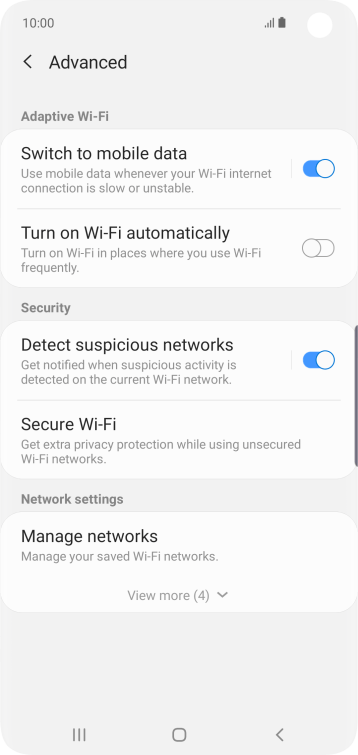
If you are asked for Mini-8 password once you tap on its name from DEVICES screen and you forget it, there is a way to reset it back
https://www.rainmachine.com/reset/ follow the Mini-8 reset password steps and choose and save another admin password for your RainMachine Mini-8.For your second issue - you need to add the same Remote Access account you had on Note 8 to the S20 RainMachine Android app in order to access and control your Mini-8 device remotely, and, of course, the Mini-8 should be connected to your rental house Wi-Fi and internet.
Hope that helps, Paul
Happy Easter!
Julian
RainMachine Support
Please sign in to leave a comment.
Comments
4 comments