RainMachine HD - hanging periodically

Hello,
I have a RainMachine HD-12 and this has happened twice recently. The first time was Jan 25 and the second was yesterday.
The problem is that the device is hanging / mostly unresponsive. The web UI will load partially but most HTTP requests are timing out. I can ssh in, but as soon as I hit any single key, the connection is closed, and no new ssh connections are accepted for a while:
% ssh rainmachine
void endpwent()(3) is not implemented on Android
root@rainmachine:/ # [HIT ANY KEY AND THEN] --> packet_write_wait: Connection to 10.0.0.42 port 22: Broken pipe
When I go look at the device, the wrench is flashing. The first time, the touchscreen said "RainMachine application has stopped" and I had to pull the power cord; yesterday the touchscreen was ok and I was able to reboot the device from the menu. After a reboot, everything is back to normal.
Here's my version info:
Firmware version 4.0.974
Web UI Version 1.9
Hardware revision 3
API 4.6.0
Any ideas? Thank you!
-

This morning the unit was still working fine, I did not make any changes yet to the display backlight settings. I thought that may be my nightly router reboots could have something to do with the issue. So to check, I manually rebooted my router this morning. When the router was offline, the wrench is blinking. After the router came back online, the rainmachine was back too. Fing showed all ports active.
So I used the web interface via Google chrome on my phone (http: // Local IP :8080/ui) to check the system settings. When I went to the system settings page, the rainmachine lost connection again. The fing network scanner showed no open ports anymore and the wrench was NOT blinking on the unit.
I have the feeling that the automatic router reboots contribute to this issue, that could explain why I have the issue now much more often (I enabled these last winter).
Please check in your lab the automatic reconnecting after losing WiFi! I will try more later myself too when I have more time. If this is the root cause then an Ethernet adapter might be a solution too.
P.S. although I have a mesh WiFi too, the rainmachine is connected to the guest network. To my opinion this is no mesh WiFi.
-

I no longer have my RainMachine and had to replace it because these issues not being addressed was driving me crazy.
But if it helps, I had my WiFi router and access points rebooting every night, too. So I'm guessing between that and the unit going to sleep, screen dim, etc., that the RainMachine's WiFi can't/isn't reconnecting on its own... without a reboot of its own.
I think at one time I asked support if the RainMachine could be scheduled (determined by the user) to have it reboot on its own because a reboot seems to clear up this issue and reconnects the WiFi. Right?? But support never seemed to be interested in this workaround.
-

Anyone with WIFI reconnect issues on mesh/dual routers and interested in trying a beta update along with a high gain antenna please send an email to beta@rainmachine.com with subject [WIFI MESH BETA] <Forum Username>. Please include your forum user name so we can track the issue along in this forum.
-
I'm definitely interested. I've disabled the nightly router reboots this week and since then the connection to the rainmachine has not been lost anymore! So I'm absolutely confident the root cause is that the rainmachine cannot automatically reconnect by itself after the WiFi connection is lost.
I hope it can be solved quickly ;)
-
Incidentally: I replaced my wifi dongle with a new TL-WN725N and just had the problem again today. I don't have mesh wifi but I do have multiple hardwire Unifi APs. So if the issue is with more than one AP broadcasting the same SSID on different channels, then yes I'll sign up for the beta and see if it fixes it.
-
We are preparing to release the beta that include some tentative fixes for the issues that some of you experience.
Please note that these software improvements are for customers with good WIFI signal >-60dbm for which the RainMachine HD fail to reconnect especially in MESH/multipoint/repeater configurations.
Beside the software changes, we also have a new long range wifi adapter that we'll provide, if needed, for the beta testers that had enrolled.
After update you should let the system work as before without intervention and hopefully the reworked default method will work for everybody.
For those that after update still observe issues please follow the instructions below (Selecting Experimental WIFI Mode) and let us know if it solved your issue.
Only do this step if you are still having issues with re-connection after update.
Selecting Experimental WIFI Mode:
1. All steps to be performed on local display interface
2. Go to Main Settings screen (tap on WRENCH led)
3. Quickly tap 11 times below the cards in a rapid manner
4. A new drawer menu should appear (as in screenshot)
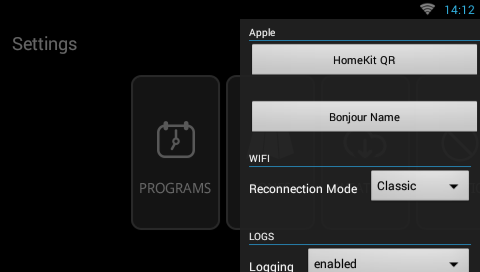
5. On WIFI select Reconnection Mode: Experimental.
Thank you !
-
After my update the photos were still there, so that's not expected I think. But now the wrench is again blinking and I cannot access the rainmachine, not over the web nor locally. So for me this update is not better and looking at all the push messages probably even worse than the previous release. So I would like to go back to the previous stable release, that was working OK as long as I disabled the nightly router reboots.
When I click the blinking wrench I see only the "weather data" as fail, WiFi connection, location set and system time set are OK.
It still feels the weather data has any influence...
But I will now wait and see for the coming hours if the rainmachine gets back on its own without a reset.
-
This morning I noticed that the rainmachine became back online directly after my nightly router reboot! So now the WiFi reboot makes the rainmachine reboot, but there is still a disconnection issue of the rainmachine itself.
Directly after the router reboot, the rainmachine sent:
Rainmachine has been offline for at least 30 minutes
Rainmachine did not receive weather forecasts for at least 24 hours
Rainmachine is now onlineDoes this help?
-
Is there any update on this issue. I keep on getting many offline/online push messages per day from the rainmachine. It is often not reachable but reconnects automatically. This behavior is much worse than with the stable release and the nightly router reboots disabled.
Can we expect any improvement on this soon or can I better switch back to the stable release SW?
-
We are monitoring and we will most likely release another beta before going stable. Once you are on beta you can only switch back to stable once we release a new stable version.
So now re-connection works fine but it still disconnects often. Are you on Experimental reconnect mode or normal ? Would you like to send us an email to beta@rainmachine.com with your home address so we can send you a high range WIFI adapter to try ? I want to eliminate the possibility of a signal/compatibility issue.
-

Running the beta, I am seeing fewer disconnects (based on notifications) and have only had the controller fail to reconnect (requiring a power cycle) once though it is still disconnecting. Is this perhaps a signal issue or something still being addressed in firmware? It's definitely a step in the right direction!
-
This morning, the rainmachine was unavailable again with the high gain adapter in normal WiFi mode. The network tools showed all items fail, but there was no blinking wrench! Both local and remote connection did not work.
I have now switched over to the experimental mode. Let's see what happens. WiFi strength showed -41dBm, so still good.
-
Not exactly, the high gain adapter was installed on Monday (together with a power cycle) and the connection on Tuesday and Wednesday was OK and on Thursday it was lost again.
Last 2 weeks I have also tested an USB to Ethernet adapter. That worked very well, much faster connection. But also that connection got lost after about 2 weeks.
I am not so happy in trying with the backlight on due to some bad stories about that on this forum.

Please sign in to leave a comment.
Comments
105 comments