WUnderground Error: Failed to get simple forecast

I have the correct API Key in place, and validated WU shows my station (KCAMANCH3), but it appears it never works.
WUnderground Parser
Global weather service with personal weather station access from Weather Underground
-
The API was completed and released two months ago, and the new API key site is available.
I'd ask that you please fix the code, so I can once again use my personal weather station’s actual rain data. That’s the reason I selected RainMachine.
Victoria.Gardner@ibm.com at WeatherUnderground asked that you contact her at this email address with any questions about the new API. -

I just posted about this in the weather forum. Here is a link to the documentation on the new API...I believe this was released several months ago.
https://docs.google.com/document/d/1eKCnKXI9xnoMGRRzOL1xPCBihNV2rOet08qpE_gArAY/edit
-
Yes, the API was released two months ago.
My RainMachine is set up to poll my PWS, and it is not working. I have the API key put in, and my station KCAMANCH3 is in the WUnderground system, I can see the data from the WU web site, but my RainMachine just reports errors.
When I followed the instructions above, and deleted the API key, it still reported the error, it seems it won't retrieve even the current data, nor the 5-day forcast.
So I just put the API key back in and retested, and "no data"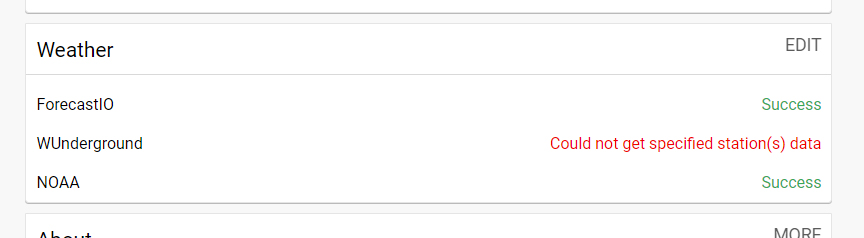
-

We have a beta version that we are testing for next update that is available here to download and install:
You should use the HTTP (not HTTPS) locally loaded web ui by just going to your RainMachine IP and then Settings > Weather > Add New.
-

Error trying to upload to RM
2019-03-08 13:48:27,214 - ERROR - wunderground-parser:459 - Error: Failed to get simple forecast: 'forecast'
2019-03-08 13:48:34,479 - ERROR - rmHTTPResourceApi4Dev:68 - API:ParserUpload: Missing required headers
2019-03-08 13:48:38,556 - INFO - rmMainManager:225 - Upgrade checked. -
Same problem here too.
2019-03-08 14:47:11,449 - ERROR - rmParser:133 - *** Error in parser 'WUnderground Parser' while downloading data from https://www.wunderground.com/weatherstation/WXDailyHistory.asp?ID=kcamanch3&day=7&month=3&year=2019&graphspan=week&format=0&units=metric, error: HTTP Error 404: Not Found
-
Sorry, I was mistaken, I was assuming things that were not in evidence.
If I put my API key in, I get the "Error: Failed to get simple forecast: 'forecast'"
If I remove the key, it does not attempt to get the simple forecast, and thus I don't get an error, I get "Success"
In no case do I get the simple forecast.
Since the API has been complete for a couple months, can we expect a new parser that will retrieve the 5-day forcast that WU provides free of charge?
The beta Python script does not load, it generates the following error:2019-03-09 15:08:54,684 - ERROR - rmHTTPResourceApi4Dev:68 - API:ParserUpload: Missing required headers
-

Tried emailing support multiple time with this issue and no response indicating that they knew about the API issue and offereing a workaround - just boilerplate "hit refresh and try again". If history is any guide here, the wait for a release fix via firmware update will take months. The only workaround for those that only use Wunderground as your forecast source is to enable NOAA for your forecast data. I did this and the rainmachine updated the forecast info.
Hope that helps anyone with a short term fix. Really disappointing what is happening with this product.
-
Aaron, we will have an updated version for WUnderground in the next beta release. Until then we will post updates to the parser so you can install it yourself.
As for forecast information, if you are in US, NOAA is, in my opinion, a better choice than WUnderground (which afaik uses NOAA data in their forecast model).
-
On my RM8 I have "4.0.975 (no updates)"
On my RM12 I have "4.0.974 (no updates)"
My browser is Chrome 72.0.3626.121
I call WU because I have PWS (KCAMANCH3 and KCABELMO54) and my local data is far more accurate for my locations. If I didn't have to go through WU to use my PWS data I'd be thrilled. -
Yes, I am using Windows, I tried 7, 8.1 and 10 on three different machines and two models of RM with two different firmwaare revisions. (.974 & .975)
I have no other alternative, so that's what I'm doing for now.ERROR - rmHTTPResourceApi4Dev:68 - API:ParserUpload: Missing required headers
-
I used Mac OS with Firefox and was able to upload the Beta script to my RM8
I set that script with my API key, ticked the useCustomStation flag, added my station name in upper case.
I left the existing WUnderground parser enabled.
The Beta script reports "ERROR: Cannot get station data"
The regular WU script returns "Success"
Log:2019-03-10 15:31:49,569 - ERROR - user-wunderground-beta-parser:131 - ERROR: Cannot get airport stations 2019-03-10 15:31:50,093 - ERROR - user-wunderground-beta-parser:265 - ERROR: Cannot get station data 2019-03-10 15:31:50,757 - INFO - user-wunderground-beta-parser:89 - WUnderground: station data retrieved for KCABELMO54
-
Nicholas,
you said "As for forecast information, if you are in US, NOAA is, in my opinion, a better choice than WUnderground (which afaik uses NOAA data in their forecast model)"
That is simply inaccurate. From the Wunderground Info page: https://www.wunderground.com/about/data
"All of our forecasts are generated from our proprietary forecasting system that leverages our vast amount of neighborhood weather data that we get from our community - we refer to the system as BestForecast™".
Just because they broke the free API link for everyone that is new to Rainmachine does not mean you have to downplay Wunderground. Getting forecast data from Wunderground is still important and necessary for those that use it. The screen scraping that you are doing as a workaround for users combined with NOAA forecast data is just not the same as using the wunderground API in my opinion. I believe that workaround cripples the usefulness of Wunderground. if I did not have access to the API, I probably would not be using it and perhaps switching to another product that allowed direct connection.
-
I deleted the first script, installed the second, added the key and local station, enabled the parser on my RM8 and it seems to be working.
2019-03-11 16:20:02,221 - INFO - rmParser:69 - *** Registering parser WUnderground Beta Parser with interval 21600
2019-03-11 16:20:02,232 - INFO - rmParserManager:384 - * Parser user-wunderground-beta-parser.py successful loaded from file '/rainmachine-app/RMParserFramework/parsers/user-wunderground-beta-parser.py'
2019-03-11 16:22:41,613 - INFO - user-wunderground-beta-parser:87 - WUnderground: station data retrieved for KCABELMO54
2019-03-11 16:22:41,623 - INFO - user-wunderground-beta-parser:95 - WUnderground: forecast data retrieved.
2019-03-11 16:22:49,840 - INFO - rmMixer:123 - *** DATA IN THE PAST: 2019-03-10 00:00:00
2019-03-11 16:22:49,990 - INFO - rmMixer:124 - *** Received data: ('2019-03-10 00:00:00', temp=9/1, minTemp=None/0, maxTemp=None/0, rh=92/1, minRh=None/0, maxRh=None/0, wind=0/1, solarRad=None/0, skyCover=None/0, rain=17.53/1, et0=None/0, pop=None/0, qpf=None/0, condition=None/0, pressure=101.39/1, dewPoint=8/1, userData=None, minTemp=7/0, maxTemp=14/0, minRH=72/0, maxRH=97/0, et0cal=None, et0final=None)
2019-03-11 16:22:50,240 - INFO - rmMixer:131 - *** Added Existing data: '2019-03-10 00:00:00', temp=9.52/1, minTemp=None/0, maxTemp=None/0, rh=91/1, minRh=None/0, maxRh=None/0, wind=0.025/1, solarRad=None/0, skyCover=None/0, rain=17.52/1, et0=None/0, pop=57/1, qpf=3.74/1, condition=2/1, pressure=101.4/1, dewPoint=7.98/1, userData=None, minTemp=6.84/1, maxTemp=13.73/1, minRH=71/1, maxRH=95/1, et0cal=1.7201878582284003, et0final=1.72
2019-03-11 16:22:54,543 - INFO - rmSimulator:571 - * Correction: Zone 1 et0Delta=0.04, qpfDelta=11.67, rain=17.52, realPrecip=16.72, qpfUsedLimited=5.05 -
I can't install the script on my RM12 until the bug in uploading is fixed, so I hope the new firmware is released soon.
My RM12 is located in an area of very sparse data, so NOAA disregards my station because the data doesn't match my neighbors (the nearest of which is 11 miles away, on the beach, and 2200 ft lower) while the WU forecast includes my PWS.
Good luck! -
Aaron,
I might be wrong but they did use NDFD + NOAA station + Airports supplemented by their users stations (which usually post to NOAA too).
Of course the forecast model is not the same as NOAA one. Being better or worse is indeed hard to say.
On the page that you linked they say that only WUnderground uses satellite and radar. As far as I know only NOAA launched their own satellites and they do use both satellite and radars. Actually there is a wealth of data available on NOAA that we aren't yet using fully but we will include NOAA stations and other information in the near future.
I personally wasn't happy with WU because I was receiving wrong data from their old API even if it did record correctly on their side. We'll see how the new API will fare.
RainMachine like to offer options to users that aren't tied to a single service and for now WUnderground is pretty important for observed data, especially if you are outside US.
-
@Paul Grace Thank you!
I uploaded the latest py script above using a Mac with Safari with no problems!!! Disabled old WU and enabled the user defined WU Beta service with new API from WU.
My rainmachine has successfully sync'd and pulling down the weather forecast using the Beta WU Python script user added service + new API from WU.
Hope you guys get the Firmware updated soon.
-
Hi Thomas. With windows you cannot upload the script into your Rain Machine, so you will have to wait for new firmware to update your machine.
Sorry.
It's best to disable the WU weather to stop the error message until the new firmware is released.
It is also supposed to resolve the Windows uploading bug, but that's a chicken/egg problem.


Please sign in to leave a comment.
Comments
64 comments