Ethernet
Pinned Featured Implemented
Since the 2nd generation machines include USB ports, why not add the drivers to allow use of other external services. For example, a USB Ethernet *RJ45) adapter. Where available, wired Ethernet adds an extra measure of reliability (less complexity = greater reliability).
-

In August 2017 I implemented Joe's suggestion solution of using a TP-Link link Adapter (same one as his link to Amazon). It is now toward the end of October and my experience during the last 3 months is that the setup works very well. I have not had one network dropout. Or maybe I should say that I know of and had to take action to fix.
The bottom line is that this solution is very reliable, simple and cheap ($12) solution to a weak WiFi signal IF you can get a Ethernet wire to the unit. And it has stood up to the Texas heat for the last 3 months. Since the WiFi signal only has to travel 4 inches, I named my network "SmallNet". I'm happy!
Having said all of that, of course it would be a much better solution to have a USB to wired Ethernet and leave the WiFi out of the picture completely...
-

Thanks @Nicholas...
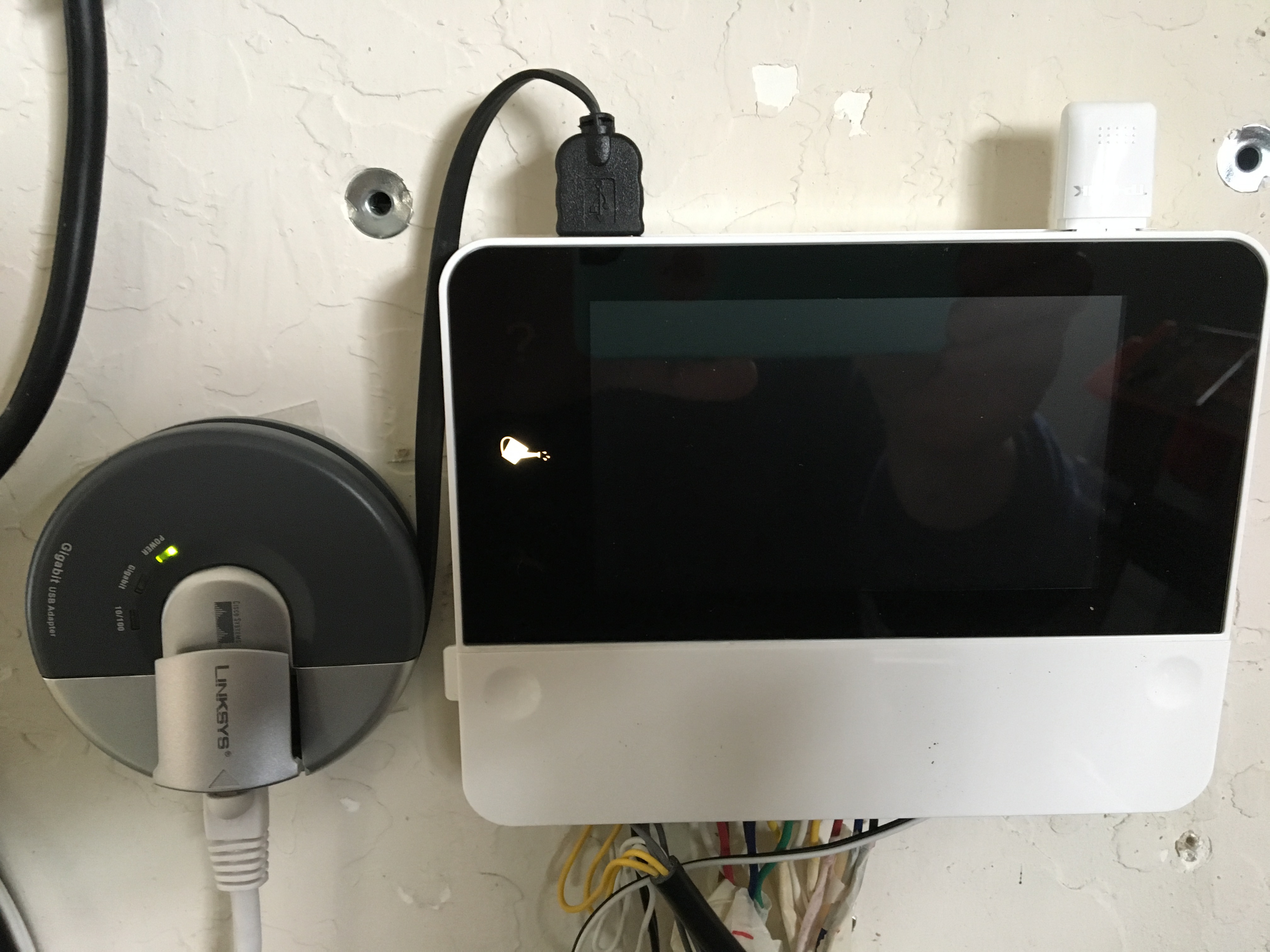
Ordered the Linksys device... appears to be working, a bit unconventional and hacky given there is no native network diagnostic or update capability .. maybe future firmware releases ??? So what that means is that it won't automatically update firmware ( a bit troublesome but a trade-off having the reliable network connection capability)... Assume someone has tested that the device can request weather updates ?
-

You can add the "TechRise Ethernet Adapter, USB 2.0 to RJ45 Fast Ethernet LAN Network Adapter" to the list of adapters that work.
All the known issues in the first post still apply (would be nice to get some of that working).
The main issue I am having is getting an error when trying to confirm my email address verification so that I can access the device remotely while off the lan. Any advise?
-
Thank you Brandon, I got that all working and added another adapter that works to the list "TechRise Ethernet Adapter, USB 2.0 to RJ45 Fast Ethernet LAN Network Adapter".
The last issue I am having is getting an error when trying to confirm my email address verification so that I can access the device remotely.
-

Please email me your email address that you use for Remote Access and I will look into it for you and respond. Brandon@rainmachine.com
-

Anyone else dropping cloud connection ?
I switched to the wired connection via adapter about a month back. Since then my local connection (lan via ip) has been fantastic
However, twice now I have found my RainMachine offline, blinking. I bet another restart would fix it but it’s clearly not a local connection issue. -
To help narrow down the issue, you could try port mapping and direct access. This would take the cloud out of the picture.
You would only need to forward port 8080 to the RainMachine and then setup Direct access: RainMachine APP > Device List > Menu Icon (3 horizontal lines) > Network Settings > Direct Access
This is something that is being looked into.
-
Thx for asking.
It says weather data internet connectivity: fail
Rest says:ok , including WiFi connection even though I have WiFi off.network tools shows:
false
false
Then fail for all
down to ssid which shows n/a
trying update on screen I get message of no internet
From within the app I can see and control it fine via local IP In fact I just sent diag logs from app to your server
-
no, the fundamental issue of on occasion losing access is not solved.
so far I just power cycle the rain machine and then it shows back up via cloud
my local access stays working just fine now that I am using ethernet
I cannot find pattern of when I lose cloud access but has happened a few times now
-
Posting a follow up here. I’ve been rock solid stable since early May with both cloud and local after going to Ethernet.
However today rain machine went offline (for local and cloud). Was weird, few hours ago I got push notice of rain sensor wet, it’s continued to rain here. Now strange: I got a push notice of rain sensor dry, tried to check rain machine and it was offline. Power cycled and it’s back. I had checked it ealier today so I think it went offline and sent the false rain sensor dry push notice at same time.
-

Looks like the Pro has now been released:
https://www.rainmachine.com/products/rainmachine-pro.html
But we have to give up the nice Touch HD interface, so I guess the question still stands:
Any idea when we might get first-class Ethernet support?
-
Wonder what else has changed ... wiring layout looks nice, 16 zone is nice, touch screen gone (I don’t care but clearly others may), built in Ethernet (good)...
Any chance you will out up a comparison page of old vs new, please??
Also I would suggest filling one with 16 zone wires, Ethernet plug and adding that photo.
@Gary,
Understood on your reluctance to use non official Ethernet on the older unit. I will say it plugged right in, one setting on the screen to change (I think) and I’ve found nearly perfectly stable. I did it as a $10 experiment before putting my Rain Machine in the trash. Glad I did since it was super easy and I really like my RM now.If only I could figure out the seasonal / predictive watering levels a bit more as they were too aggressive on saving water. Oh and when they get Alexa working better, my dogs still vote for “Alexa, pause the sprinklers for 5 minutes” .. so my dogs can pee.
-
Gary, the Pro-16 still has a Touch screen, just a little bit smaller the the HD. It even has a new interface.
We are still working on making sure the HD-12, interface with a wired connection, this is still a new feature for the most part.Jeff, if you call or email into support we can login to your system with you and recommend some fine tuning adjustments to get it watering correctly.
Brandon
RainMachine Support -

> Any idea when we might get first-class Ethernet support?
The only hold out at this moment is that our base OS on HD12/16 (Android) doesn't know anything about Ethernet by default.
We are trying to improve this in next updates.
> Any chance you will out up a comparison page of old vs new, please??
Jeff Jeff here it is: https://www.rainmachine.com/products/index.html


Please sign in to leave a comment.
Comments
108 comments