Notifications in Android App hard to control
Fixed
This is a minor complaint. Android version of the RainMachine app, version v4.2.25, on Android 8.1.0. Reinstalled the app about a week ago (phone had to be factory wiped, long story). Works great, but starts putting out way too many notifications: I really don't want to know when watering turns on and off every few hours. What I would like to do is to turn notifications "down", but not completely off: if there is a significant problem or change (like valve overcurrent, failure to get weather data, loss of communication, ...) it would be nice, but not for regular watering.
According to https://support.rainmachine.com/hc/en-us/articles/115002904108-Mobile-Push-Notifications the notifications are turned on using the "Settings" menu item on the app. That page is obsolete, there is no longer a "Settings" menu, only "Network Settings". According to the more up-to-date https://support.rainmachine.com/hc/en-us/articles/228000548-Devices-Screen there should be a "Notification" switch in the "Network Settings" page, but there isn't. So I went to the Android Settings instead, and turned off *all* notifications from RainMachine, but that throws out the baby with the bathwater.
According to older discussions https://support.rainmachine.com/hc/en-us/community/posts/360006749773-Can-t-turn-on-notifications-in-latest-Android-build-4-2-11 , it helps to edit the e-mail in the "Remote Access" menu. I don't understand how to do that: That is already set to the correct e-mail, and I can't enter an incorrect e-mail like "foo@example.com", because there is no RainMachine registered to the incorrect e-mail. Also, Android doesn't seem to give me an option to clear the data for the RainMachine app ... so I simply re-installed it. Didn't change a thing, there is still no Notification control in the app itself.
I think my real request is that you need to update the documentation about how to do this correctly ... probably the problem is that I'm trying the wrong technique. But fine-grained control over notifications would be nice.
-

Hi, Ralph
According to the more up-to-date https://support.rainmachine.com/hc/en-us/articles/228000548-Devices-Screen there should be a "Notification" switch in the "Network Settings" page, but there isn't.
That's right, sorry about that, we moved it from there under RainMachine Android mobile app: Settings - Notifications
We changed the article and it doesn't mention it anymore.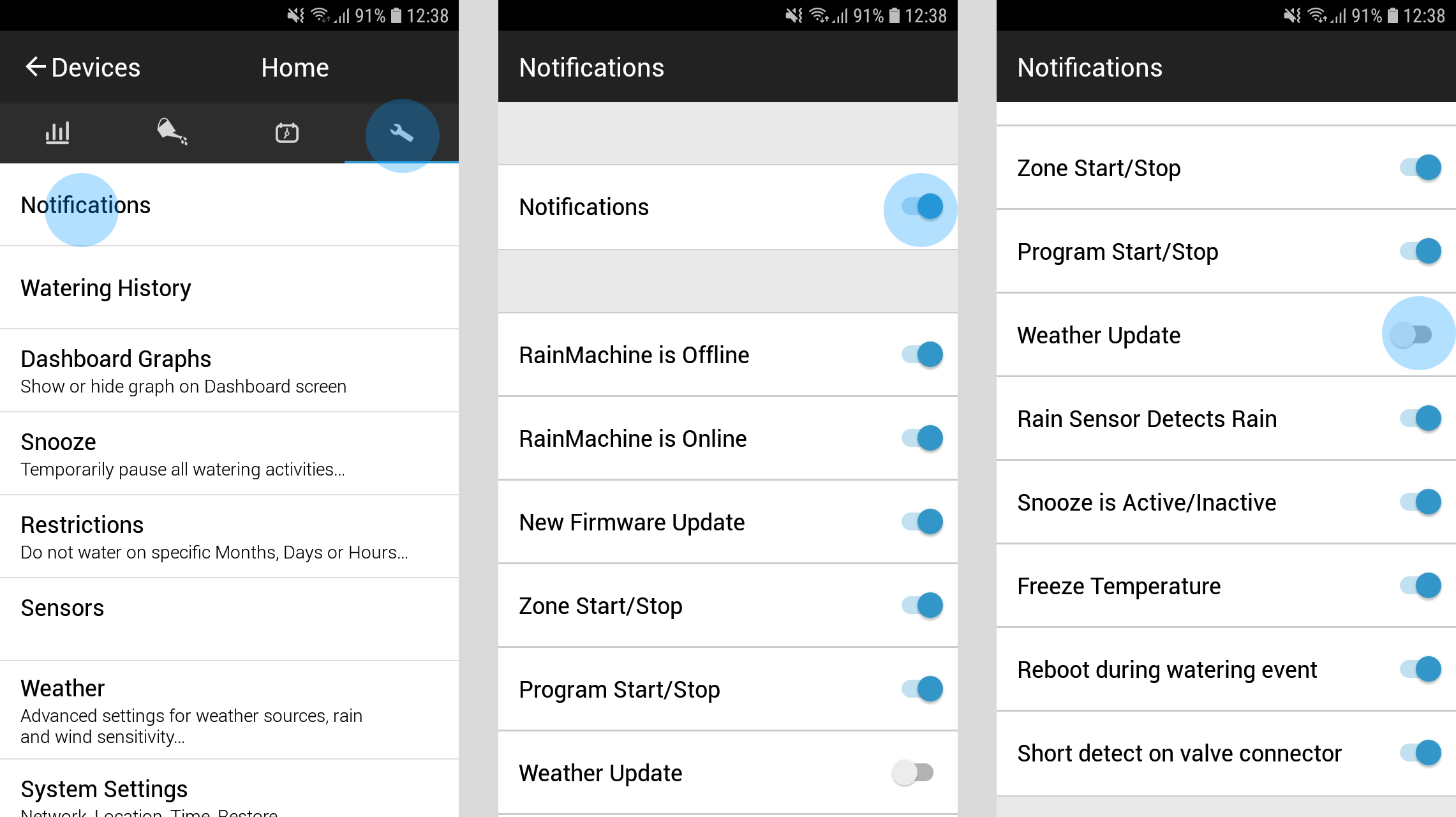
(right click and choose "Open image in a New Tab")
As you can see in the screenshots attached (we are using a mobile phone with Android version 8.0.0 installed) open the RainMachine mobile app on the Android phone and connect to your RainMachine and then go and tap on the Settings icon wrench from the upper side menu you will get the Settings menu. The first option is called Notification - if you have a valid remote access account (email address + RainMachine password) your phone will be validated with our servers automatically once you switch the Notification first option to ON.
After that simply switch off any notification you do not need and keep ON the one you do. They will be automatically saved and you'll get only the one you activated in this screen.
Thank you for your suggestion. We will consider it for our next development cycle.
Hope this helps, Ralph
Thank you,
RainMachine Support
Please sign in to leave a comment.
Comments
3 comments