RainMachine HD - hanging periodically

Hello,
I have a RainMachine HD-12 and this has happened twice recently. The first time was Jan 25 and the second was yesterday.
The problem is that the device is hanging / mostly unresponsive. The web UI will load partially but most HTTP requests are timing out. I can ssh in, but as soon as I hit any single key, the connection is closed, and no new ssh connections are accepted for a while:
% ssh rainmachine
void endpwent()(3) is not implemented on Android
root@rainmachine:/ # [HIT ANY KEY AND THEN] --> packet_write_wait: Connection to 10.0.0.42 port 22: Broken pipe
When I go look at the device, the wrench is flashing. The first time, the touchscreen said "RainMachine application has stopped" and I had to pull the power cord; yesterday the touchscreen was ok and I was able to reboot the device from the menu. After a reboot, everything is back to normal.
Here's my version info:
Firmware version 4.0.974
Web UI Version 1.9
Hardware revision 3
API 4.6.0
Any ideas? Thank you!
-

I have the same problem. My RainMachine Touch HD-12 was "rock solid" for a couple of years. Then, in the past year or so, it seems to lose connection to my WiFi... or at least I can't see it on my local network from my phone. If I unplug it, it will reconnect and work just fine, but then a few weeks will pass, and I'll have to unplug/replug it again. It has firmware v4.0.974. Can someone please help? BTW, is there a way to automatically have it reboot periodically? This would be a great work-around to the issue and nice feature to have to where I can have it reboot at a a certain every day, or once a week, etc.
-

Before you unplug can you check if it blinks the wrench or has WIFI signal ? Does the display come back to life if you touch it ?
A list of known to work WIFI adapters: https://support.rainmachine.com/hc/en-us/community/posts/360009524834-HD12-16-Beta-version-4-0-944-list-of-known-working-WIFI-adapters
-
Yeah that's my situation too, I basically never rebooted or touched the thing, then this started happening after the last upgrade. I'm not sure if it's something related to the upgrade or just a coincidence that it's been 2 years and the wifi adapters are starting to flake out.
Incidentally, a periodic reboot is not a bad idea. If you have ssh access enabled, you could run a cron job or scheduled task from somewhere else on your network, to reboot via ssh once a week. There's a minor bug here though, also related to the wifi: if you do "ssh rainmachine reboot" it will reboot but never close the connection. Your ssh session will just hang forever. So if you're going to script this, you'll need to arrange for it to timeout.
-

I have this issue as well. I send in my unit for repair with out of pocket expenses due to my system been out of warranty... rainmachine found no issues.... This issue is random and when you guys tested only tested for a few hours and determine that the system was "OK"
I am glad I am not the only one with this problem and rainmachine can look at this closer!
-
In my case is just like describe by the OP, The system is partially accessible and responding to ping and partial requests.... But the application is unresponsive at the display. As stated by the OP the wrench is blinking... When I touch the wrench and I get the display lit I see the wireless signal in "sleep mode" but comes right on when the display lights up....
Thats when I try to touch around I get the unresponsive message....
-

I am seeing something very similar. I notice the wrench blinking and only getting 1 out of 4 replies back to ICMP (ping). Web interface starts to come up but won't, can't connect in the app either. If I go and wake up the device by touching the wrench it starts to respond normally. I even captured some traffic with tcpdump this last time, this tcpdump is coming directly off of my AP (Ubiquiti AP-AC Pro in case that is somehow relevant).
10.11.0.18 = RainMachine
davids-air.localdomain = My Macbook which is performing the ping (on a different subnet/vlan but traffic is allowed in case that somehow matters)
10.11.0.1 = pfsense gateway
21:15:04.129967 IP davids-air.localdomain > 10.11.0.18: ICMP echo request, id 55751, seq 773, length 64
21:15:05.133585 IP davids-air.localdomain > 10.11.0.18: ICMP echo request, id 55751, seq 774, length 64
21:15:06.136745 IP davids-air.localdomain > 10.11.0.18: ICMP echo request, id 55751, seq 775, length 64
21:15:06.262597 IP 10.11.0.1.67 > 10.11.0.18.68: BOOTP/DHCP, Reply, length 300
21:15:07.141178 IP davids-air.localdomain > 10.11.0.18: ICMP echo request, id 55751, seq 776, length 64
21:15:08.145215 IP davids-air.localdomain > 10.11.0.18: ICMP echo request, id 55751, seq 777, length 64
21:15:09.148587 IP davids-air.localdomain > 10.11.0.18: ICMP echo request, id 55751, seq 778, length 64
21:15:10.153367 IP davids-air.localdomain > 10.11.0.18: ICMP echo request, id 55751, seq 779, length 64
21:15:10.326346 IP 10.11.0.1.67 > 10.11.0.18.68: BOOTP/DHCP, Reply, length 300
21:15:11.156572 IP davids-air.localdomain > 10.11.0.18: ICMP echo request, id 55751, seq 780, length 64
21:15:11.160998 ARP, Reply 10.11.0.1 is-at 00:90:0b:7a:8a:a6 (oui Unknown), length 42
21:15:11.163911 IP 10.11.0.18 > davids-air.localdomain: ICMP echo reply, id 55751, seq 780, length 64
21:15:12.161390 IP davids-air.localdomain > 10.11.0.18: ICMP echo request, id 55751, seq 781, length 64
21:15:13.164706 IP davids-air.localdomain > 10.11.0.18: ICMP echo request, id 55751, seq 782, length 64
21:15:14.166330 IP davids-air.localdomain > 10.11.0.18: ICMP echo request, id 55751, seq 783, length 64
21:15:14.497179 IP 10.11.0.1.67 > 10.11.0.18.68: BOOTP/DHCP, Reply, length 300
21:15:15.170071 IP davids-air.localdomain > 10.11.0.18: ICMP echo request, id 55751, seq 784, length 64
21:15:15.174569 ARP, Reply 10.11.0.1 is-at 00:90:0b:7a:8a:a6 (oui Unknown), length 42
21:15:15.176672 IP 10.11.0.18 > davids-air.localdomain: ICMP echo reply, id 55751, seq 784, length 64
21:15:16.174641 IP davids-air.localdomain > 10.11.0.18: ICMP echo request, id 55751, seq 785, length 64
21:15:17.180026 IP davids-air.localdomain > 10.11.0.18: ICMP echo request, id 55751, seq 786, length 64
21:15:18.183240 IP davids-air.localdomain > 10.11.0.18: ICMP echo request, id 55751, seq 787, length 64
21:15:18.716311 IP 10.11.0.1.67 > 10.11.0.18.68: BOOTP/DHCP, Reply, length 300
21:15:19.186816 IP davids-air.localdomain > 10.11.0.18: ICMP echo request, id 55751, seq 788, length 64
21:15:19.191838 ARP, Reply 10.11.0.1 is-at 00:90:0b:7a:8a:a6 (oui Unknown), length 42
21:15:19.195414 IP 10.11.0.18 > davids-air.localdomain: ICMP echo reply, id 55751, seq 788, length 64
21:15:20.188749 IP davids-air.localdomain > 10.11.0.18: ICMP echo request, id 55751, seq 789, length 64
21:15:21.192215 IP davids-air.localdomain > 10.11.0.18: ICMP echo request, id 55751, seq 790, length 64
21:15:22.195029 IP davids-air.localdomain > 10.11.0.18: ICMP echo request, id 55751, seq 791, length 64
21:15:22.973060 IP 10.11.0.1.67 > 10.11.0.18.68: BOOTP/DHCP, Reply, length 300
Once it is working again then I only see the ICMP request and replies and everything else is working too (web interface, app). I also stop seeing the DHCP replies from my gateway, I never saw the requests here because I was running tcpdump host 10.11.0.18. It seems like the unit is continually sending out DHCP requests when it gets into this state.
This matches up with some of the logs on the RainMachine as well although tcpdump is showing it much more frequently.2019-03-14 21:02:49,889 - INFO - rmThreadWatcher:301 - Refreshed WIFI Information. (old: '10.11.0.18' new ip: None) 2019-03-14 21:03:04,037 - INFO - rmThreadWatcher:301 - Refreshed WIFI Information. (old: None new ip: '10.11.0.18') 2019-03-14 21:05:04,347 - INFO - rmThreadWatcher:301 - Refreshed WIFI Information. (old: '10.11.0.18' new ip: None) 2019-03-14 21:05:18,397 - INFO - rmThreadWatcher:301 - Refreshed WIFI Information. (old: None new ip: '10.11.0.18') 2019-03-14 21:07:18,681 - INFO - rmThreadWatcher:301 - Refreshed WIFI Information. (old: '10.11.0.18' new ip: None) 2019-03-14 21:07:30,719 - INFO - rmThreadWatcher:301 - Refreshed WIFI Information. (old: None new ip: '10.11.0.18') 2019-03-14 21:13:31,757 - INFO - rmThreadWatcher:301 - Refreshed WIFI Information. (old: '10.11.0.18' new ip: None) 2019-03-14 21:13:33,762 - INFO - rmThreadWatcher:301 - Refreshed WIFI Information. (old: None new ip: '10.11.0.18') 2019-03-14 21:15:34,075 - INFO - rmThreadWatcher:301 - Refreshed WIFI Information. (old: '10.11.0.18' new ip: None) 2019-03-14 21:15:36,083 - INFO - rmThreadWatcher:301 - Refreshed WIFI Information. (old: None new ip: '10.11.0.18') 2019-03-14 21:17:36,318 - INFO - rmThreadWatcher:301 - Refreshed WIFI Information. (old: '10.11.0.18' new ip: None) 2019-03-14 21:18:32,569 - INFO - rmThreadWatcher:301 - Refreshed WIFI Information. (old: None new ip: '10.11.0.18
Firmware version
4.0.974
Hardware revision
3
I honestly had been ignoring the issue until tonight so I am not sure how frequently this is occurring. If there's something additional you'd like me to gather if I see it again please let me know. -
These intermittent WIFI errors seems to affect some customers that have:
1. Certain models of repeaters (only TP Link reported for now)
2. Certain MESH WIFI solutions (Eero and Netgear. Netgear issues solved after a router firmware update)
3. Certain WIFI routers with dual radios 2.4 and 5GHz on same network name (SSID)
Some of the above WIFI issues were solved by using the Display setting: Local Unit UI > Setting > System > Display > Keep Display on but dim it after ...
This setting make Android system query much more often the state of WIFI.
For David issue I wonder if a static IP or a longer lasting DHCP lease setting would help.
Since these issues seems to affect a small percentage of customers, we can only gather these issues internally, add reported hardware , if possible, to our WIFI testing network.
-
Nicholas, I don't use any of the brands mentioned above, although I do have Ubiquiti APs like David Browning. I got a video when I had the issue earlier today. Note that it resolves itself after I turn on the screen and wait a few seconds:
This has all of the hallmarks of a power management issue. Did the latest firmware update include a new Android kernel? Power management stuff can change significantly between kernel versions. I'm guessing the wifi adapter is getting put into sleep mode under certain conditions, which is why it helps to always keep the display on.
-

I have the same issue and I also have an Ubiquiti AP. In my case, the device will show offline in the application and when I go to the panel, and touch the wrench icon, a message will pop up that the application is hung and asks me if I want to restart it. Once I restart the application, it seems to start working again. This usually happens on a 2 or 3 week interval.
-
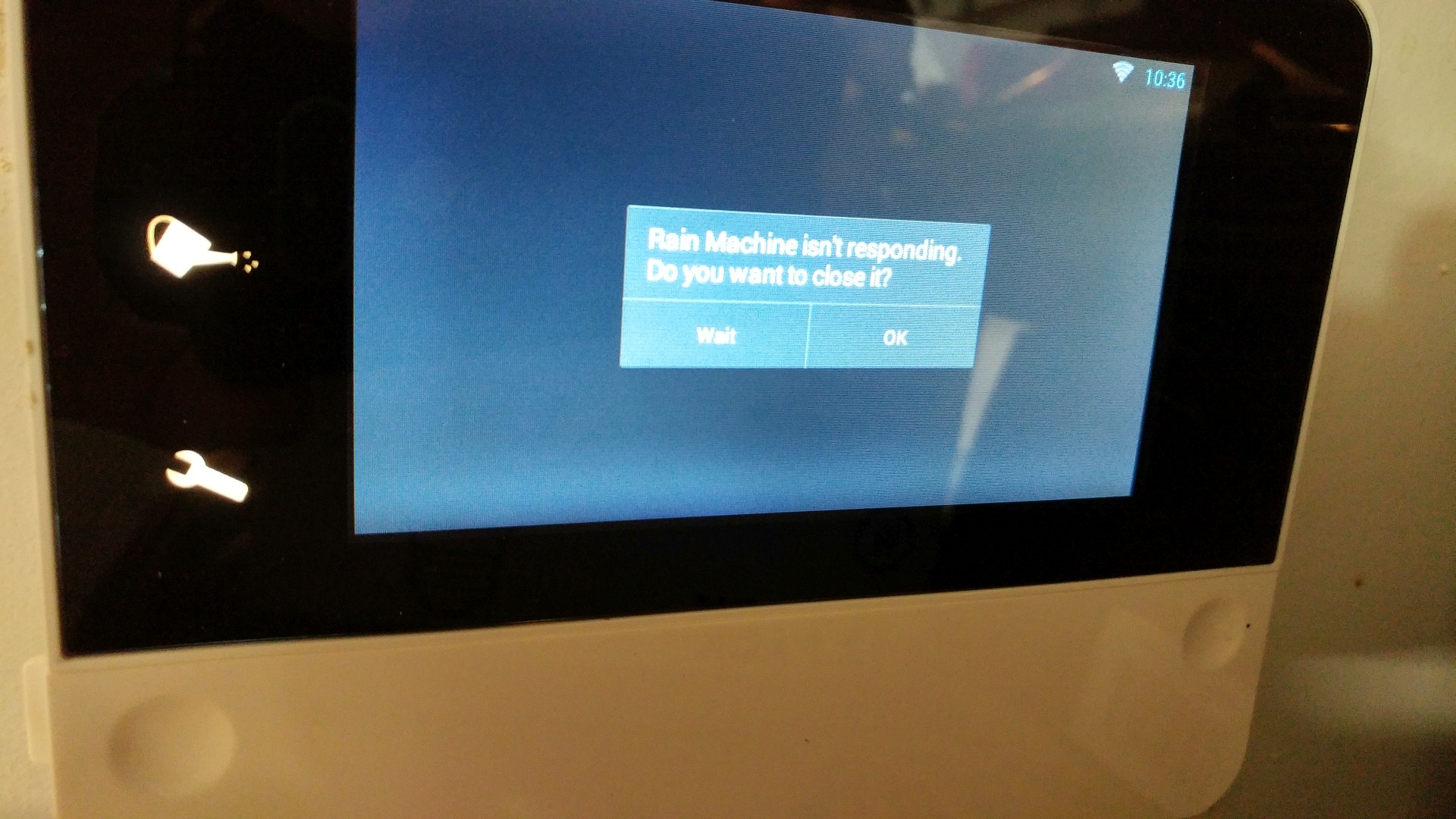
Mine locks up about every week or so. Won't respond, have to unplug it to reset it. Typical Windows OS issues. I don't understand why the developers can't add an option for it to automatically reboot periodically, whether it's every day, or once a week, etc. There's apparently a program issue, memory leak, etc. So frustrating especially when my phone keeps getting dinged with RainMachine messages and I'm not at home to reset it. Here's what the screen looks like when it locks up:
-
BTW, I have had the same ASUS RT-AC68P WAP that I have had since I bought the RainMachine. It's rock solid with no issues with any other devices. It seems that RainMachine issues started occurring after a RainMachine firmware update. If there is some debugging I can do, gathering logs, etc., please let me know.
-

Seeing the same behavior here. Not using a mesh network. Just a regular Netgear R7000 router. No WIFI repeaters. HD-12 had been rock solid for years (literally since May 2016). After the 4.0.974 update it disconnects from the WIFI every couple of weeks and will not reconnect. Can't ssh or ping it.
Rebooting gets it going for another couple of weeks.
@Nicholas, is there a procedure to downgrade to the previous firmware while you investigate?
-
So I paid closer attention and my issue appears to be exactly the same as everyone else with the flashing wrench, press a key to wake it up, see the application crash, then it starts to work again. Since I sniffed traffic previously and did see the issue with DHCP I went ahead and assigned a static IP as suggested by Nicholas and have had zero issue since. Would someone who had been successful with the always on display method be willing to try setting a static IP and see if that also works for them (obviously disable the display workaround)? I figure the more points of data we can provide the more likely it will be a root cause can be found.

Please sign in to leave a comment.
Comments
105 comments