Photos broken

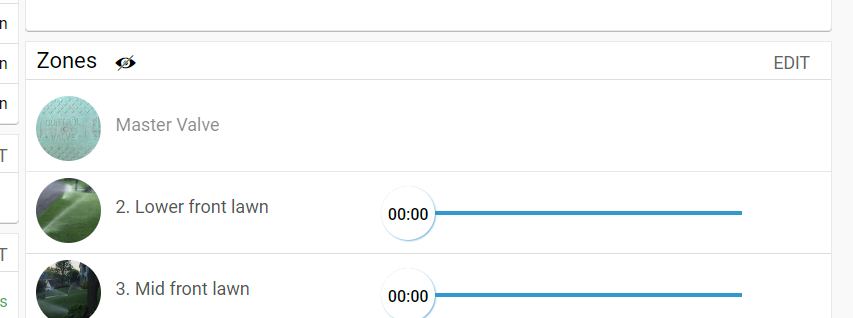
Why since your recent updates to the paid service announcement have the photos I have had for years for each zone now changed?
-
Official comment

@all
We would like you to join the iOS Beta Channel and install the new Beta app released yesterday (06.24.2022). Beside Local Network access issues we addressed the zone images one.1. Install Apple TestFlight iOS application from AppStore on your iPhone/iPad. Then access this web link on your Apple device: https://testflight.apple.com/join/mTPgsVCc
2. You'll be automatically added to our beta testing program and you will be notified by Apple TestFlight when you can install the RainMachine iOS app.
3. To revert to the current stable App Store version of the RainMachine app, just uninstall the beta app, open App Store and install the RainMachine application.
Let us know if the Beta release 4.6.124(6) fixes the issue for you.
Thank you!
RainMachine SupportComment actions -
This has nothing to do with direct access, remote access modes etc. - this started only after you made the illegal decision to change what you have already sold to many customers and this issue has come about from either backend changes or the new version of the app.
Typical responses as in the past - we didn't do anything and it takes forever to be fixed, you've never fixed the fact the master valve photo never appears so I gave up. And the lack of better support and "new" functions doesn't support funding your new subscription model as you can't fix issues anyway. So why pay for stuff you cannot fix?
-
Hi, Ian
First of all thank you for your input.
Please make sure you have read the Premium Services FAQs.
https://support.rainmachine.com/hc/en-us/community/posts/6528495927959-RainMachine-Premium-Services-FAQRainMachine Cloud Server remote access it is not required in order to access and control your RainMachine device. You can do it freely locally or remote since 2014.
To answer your question - the Zone 1 set as Master Valve doesn't have the option to add picture. If you set Zone 1 as regular zone you can add picture.
We will try to fix the issue for zones images not being displayed after the new iOS app update as soon as possible.
Again, thank you for your report and for your understanding, Ian
Justin
RainMachine Support -
Ok, Ian
The FAQs are relevant and the answer to your question is there. No service has been taken away since it was there from the start.
RainMachine Cloud Servers remote access is not required. Our RainMachine devices are cloud independent by design.
We know you understand that.
To answer your question:
That is a RainMachine Web app, it is not the mobile iOS app.
The mobile app doesn't set a picture for the Master Valve.
We are sorry about this discrepancy, but that's the way they are.
Thank you for your understanding, Ian
Justin -
Why won't it show the picture in the app for that one zone? Makes no sense. Why has it broken the pictures?
The direct access feature from outside the home network introduces security vulnerabilities that you will see in the many discussions on this topic. Per you opening line "and secure and already set up cloud remote access connection and other benefits including shared access, instant notifications, smart IoT integrations, " these being listed are functions already paid for when I purchased the device.
-
@Ian
Port Forwarding has no security threats if you use a strong RainMachine password, keep your router firmware up to date and firewall enabled. RainMachine uses the port 8080.
You know that also.If the Zone 1 is set as Master Valve on the mobile app, it doesn't show a picture.
Thank you for your understanding, Ian
Justin -
Ok, Ian
Sorry about that.
No intention from me to do that. It is just the way I finish my replies and it wasn't meant to do harm. Sorry you feel that way.Some Port Forwarding safety concern related articles:
https://portforward.com/is-portforward-safe/
https://privacysavvy.com/security/safe-browsing/port-forwarding/That port, 8080 is the RainMachine port, not your router port.
Thank you,
Justin -

Responding to Justin@RM - replaced the missing photos with my Android phone camera and the photos show on the phone app, but when looking at the web page or our iPads, only a couple of new photos appear and the others are still blank. Are the zone photos stored on the RM device, or elsewhere? Thanks.
-
Hi, David
The zones images are not stored on the RainMachine device or phone or browser, they are stored on Google Cloud and the zones images are linked to your RainMachine Lat/Long coordinates for privacy reasons. No other zones images display restrictions.
Currently we investigate this on our RainMachine iOS app and if it is related we will release an update as soon as possible. -

Justin,
You say "No service has been taken away since it was there from the start."
This is just an outright lie. We had remote access via your servers for free from the start, and advertised that way on the boxes. Now, you put that behind a paywall. This deliberate deceit, as well as the condescending attitude in the original "premium services" email is why I will never subscribe, and never recommend your devices in the future. Had y'all been transparent about your obvious cash flow issues, and the real reason for the need to start charging for things we were getting for free, I'd be a lot more forgiving. Well that, and patronizing attitude in the email and announcements. You act like we're lucky to be paying for these formerly free services, which is insulting.
-
Hi, Chris
Thank you for your messages. Nobody stays and flag them by hand. It is a filter on the forum privacy and spam filter. I approved them all, so you can see that.
Please understand that and please keep the conversation on topic.
If you want to say anything else about it, there are other users posts where you can contribute.Thank you for your understanding, Chris
RainMachine Support -
Thank you, Chris
@all
We would like you to join the iOS Beta Channel and install the new Beta app released yesterday. Beside Local Network access issues we addressed the zone images one.1. Install Apple TestFlight iOS application from AppStore on your iPhone/iPad. Then access this web link on your Apple device: https://testflight.apple.com/join/mTPgsVCc
2. You'll be automatically added to our beta testing program and you will be notified by Apple TestFlight when you can install the RainMachine iOS app.
3. To revert to the current stable App Store version of the RainMachine app, just uninstall the beta app, open App Store and install the RainMachine application.
Let us know if the Beta release 4.6.124(6) fixes the issue for you.
Thank you!
RainMachine Support -
The issue I have in installing a test version is in the past you have failed to release a new version before the expiry time and so when I wen to use it, I had to reload the old version. Before I go down this path again:
a) Confirm the photos I already have taken and assigned to zones will be restored to how they were before
b) This version will be released from test status ASAP to ensure continuation of service of the app.
-
Hi, Ian
a) That's why we released the Beta version - the fix is there, but we need you feedback on that since it is working on our side
b) All our Beta releases has been packed into Stable released on AppStore because that's the purpose of a Beta release - gather feedback, fix bugs and then release it. The only way to get the stable release is to reinstall it from AppStore. Since you have the Beta release, the AppStore will not notify you when the new update for Stable release will be available. If you don't do that during the 90 Days TestFlight Beta program period, the app will expire.
Maybe we did not notify you here on the forum or on the website when the Stable release is available on AppStore. We will fix that from now on.
Thank you, Ian
Justin
RainMachine Support -
a) You should be able to confirm that you have fixed these in the first instance. You have not confirmed - and no, it is not fixed, 2 zones have no photo and 1 is not my photo.
b) I fully understand testing cycles and release - I have worked in a development environment and ran global test programs. The issue I have is in the past you didn't create a non-test version in the 90 period so at 91 days I go to use the app and it's broken. If you did this right you'd either extend the period - I get it may take longer than 90 days for a final version - or makes that version a formal release. After all if you are still working on it 90 days later it can't have too much wrong with it not to release.
Communication is poor at best - not one person has responded from the company about the forced premium service.
Please sign in to leave a comment.
Comments
22 comments