Apple HomeKit integration
Implemented
Would love to see support for Apple's HomeKit
-

Reminder to @Brett Greer and other "I'm bailing for _______ because of the lack of RM HomeKit support" people -- do keep in mind that if _______'s cloud goes down, or they realize their business model is unsustainable and need to abruptly start charging a monthly subscription, or even suddenly go out of business -- I suspect you are still better off with a unit that functions independently, even without HomeKit.
-

I too just switched from my rainmachine mini-8 to the competing R-company unit, but it was only partially due to Homekit support promise not coming through. Quite simply, the rainmachine has been so incredibly buggy that I just don't trust it to water my landscaping. I've caught it so many times showing a watering history that doesn't make any sense, only to have to reset the "local cache" to get the app to update properly. Basically, I can't use the Forecast amount as a guage of what the rainmachine will be doing since it's glitchy and often out of sync with the device.
At one point I reached out to support about the constantly corrupt local cache and they tried to tell me it was a wifi issue on my side that must be causing corrupt data to be sent and saved on the rainmachine(!!). So basically, if true, the local app is accepting corrupt data (so there is no error checking on the data), and then it is up to me to constantly reset the local cache to trust the UI.
-

@Dan Bryk, thanks for the "reminder"! Until that hypothetical day comes, I will be loving my new R-company unit with homekit integration! Guess I could always dust off and plug back in my RM if/when that day ever comes.....but until then, I really am happy with the competitor product and can say it works great with homekit. "hey sir, turn on the front lawn sprinklers" sure gets those kids moving off my lawn fast ;)
Good luck to all. I really hope RM comes through on their promises; I just got tired of waiting with little to no new information....so instead of continuing to complain and hope for action, I took things into my own hands.
Cheers!
-

Hi, all
We would like to apologize for the lack of replies here on the forum post. Thank you all for your patience.
Our RainMachine Pro-8/16 successfully passed Apple HomeKit hardware certification.
The RainMachine iOS app have been updated to support Apple HomeKit and our RainMachine Pro-8/16 firmware with Apple HomeKit support it is currently available in Beta v.4.0.1128 (05/13/2019)
We are working on the latest touches and make our final testings before we can release a public stable version of the RainMachine Pro-8/16 firmware update.
For now, there is no estimation about Apple HomeKit support for our RainMachine Touch HD-12/16 devices.
Also, our RainMachine Mini-8 will not get Apple HomeKit support.
Thank you all for your understanding and patience.
RainMachine Support -
Hi @RainMachine support -- I must confess to being disappointed that my Mini-8 2G will not support HomeKit, although the writing has certainly been on the wall, at least in this thread.
I don't need a touchscreen, I honestly will never need even 8 zones, and my trusty Mini-8 has survived at least one winter in its Orbit outdoor case.
Would you consider offering a courtesy Amazon discount for users cross-grading from otherwise perfectly functioning Rainmachine units?
Thanks.
-

I am guessing your initial support for the Pro line is because that is the unit you have sold the most of. I am hoping you can give a bit more detail on when your flagship product, the Touch HD, might have Home Kit support. When one pays more for a product as I have, I expect it does more.
-
Hi, Dan
The RainMachine Mini-8 cannot pass Apple HomeKit hardware certification and that's why it will not have Apple HomeKit support in the future.
Please contact our support team and they will help you further if there are any offering available.We do understand your frustration, Diver, but as we said, for now, there is no estimation since our RainMachine Touch HD-12/16 hardware was released before Apple HomeKit there is no guaranty it will pass the certification. We will try it.
Thank you for your understanding.
RainMachine Support -

So a couple of things mentioned by RM above:
"For now, there is no estimation about Apple HomeKit support for our RainMachine Touch HD-12/16 devices."
"there is no estimation since our RainMachine Touch HD-12/16 hardware was released before Apple HomeKit there is no guaranty it will pass the certification. We will try it."
So, essentially you've misled your customers since late 2017 with how you've been working on Touch HD Homekit support. Nice! There were numerous times you were asked for an update and you made it clear that you have been working on it and it was coming. Now, by what you said above, it's very clear that was a lie and you haven't done anything at all with the Touch HD devices and Homekit support. By saying, "We will try it" means you have not done anything up to now.
If you had just been truthful and honest, I still would not have been happy about it, but at least you would have been transparent with your customers, which is respectable. But instead you've lied to us and I don't do business with companies that lie and deceive the folks that have spent their hard-earned money on their products. It shows how shady of a company you are and just how badly you treat your customers.
I'm done with RM for good!
-
Hi, Jestered
We have always been honest with our customers.
There is no reason to lie. We are really sorry you are thinking this way. Truly.We will not get into the details of how the certification process goes and the steps you have to make.
Our RainMachine Pro-8/16 devices were in the process of certification and not the RainMachine Touch HD-12/16.
We did not say anything about the Apple HomeKit support for the RainMachine Touch HD-12/16 if you look at this conversation.
Thank you again for your understanding.
RainMachine Support -
You have not said "anything about the Apple HomeKit support for the RainMachine Touch HD-12/16"? You're kidding right:
May 29, 2018 02:23
Once Apple finishes the software authentication protocol for HomeKit we do have the intention to add support for all our devices.A definitive answer will only be possible once the protocol has been released.
November 22, 2018 01:29
For Pro devices we are waiting for certification from Apple. For HD12/16 models we are working on porting the code.
January 17, 2019 15:38 (Edited 5 months ago)
We are working for HomeKit certification for our RainMachine Pro devices. RainMachine Touch HD-12 and Touch HD-16 will follow. There is no estimation time for now. Unfortunately, this process takes time.
Are you going to tell us again that you never said anything about supporting the Touch HD devices with HomeKit? I did as you asked and have shown you three different posts from you all, in this thread, stating otherwise. In fact, on November 22, 2018, which was 6 1/2 months ago, you said you were already working on porting the code to the Touch HD devices.
Again, clearly deceiving your customers.
-
Hi, Jestered
Yes. Thank you for reminders. Those are not lies and we are not deceiving our customers.Apple HomeKit certification for our RainMachine Pro-8/16 devices was in the works and it is available today, and the RainMachine Touch HD-12/16 devices will follow, but there is no estimated time for now.
As we said, we're very sorry you are feeling this way and we will not escalate this any further.
Thank you for your understanding, Jestered
RainMachine Support -

Hi,
The current beta (v.4.0.1125) has added Apple HomeKit support for RainMachine Touch HD12/16.
Would be great if you could install the beta version and send us some feedback. To enable and pair your iOS device with RainMachine Touch HD-12/16 please open Apple Home app on Apple iOS device (iPhone or iPad) and tap on (+) or "Add accessory" button and then go to RainMachine device and tap Settings > System > Internet of Things - Enter pairing mode and scan the generated QR code with Apple Home app (see below for a graphical tutorial).
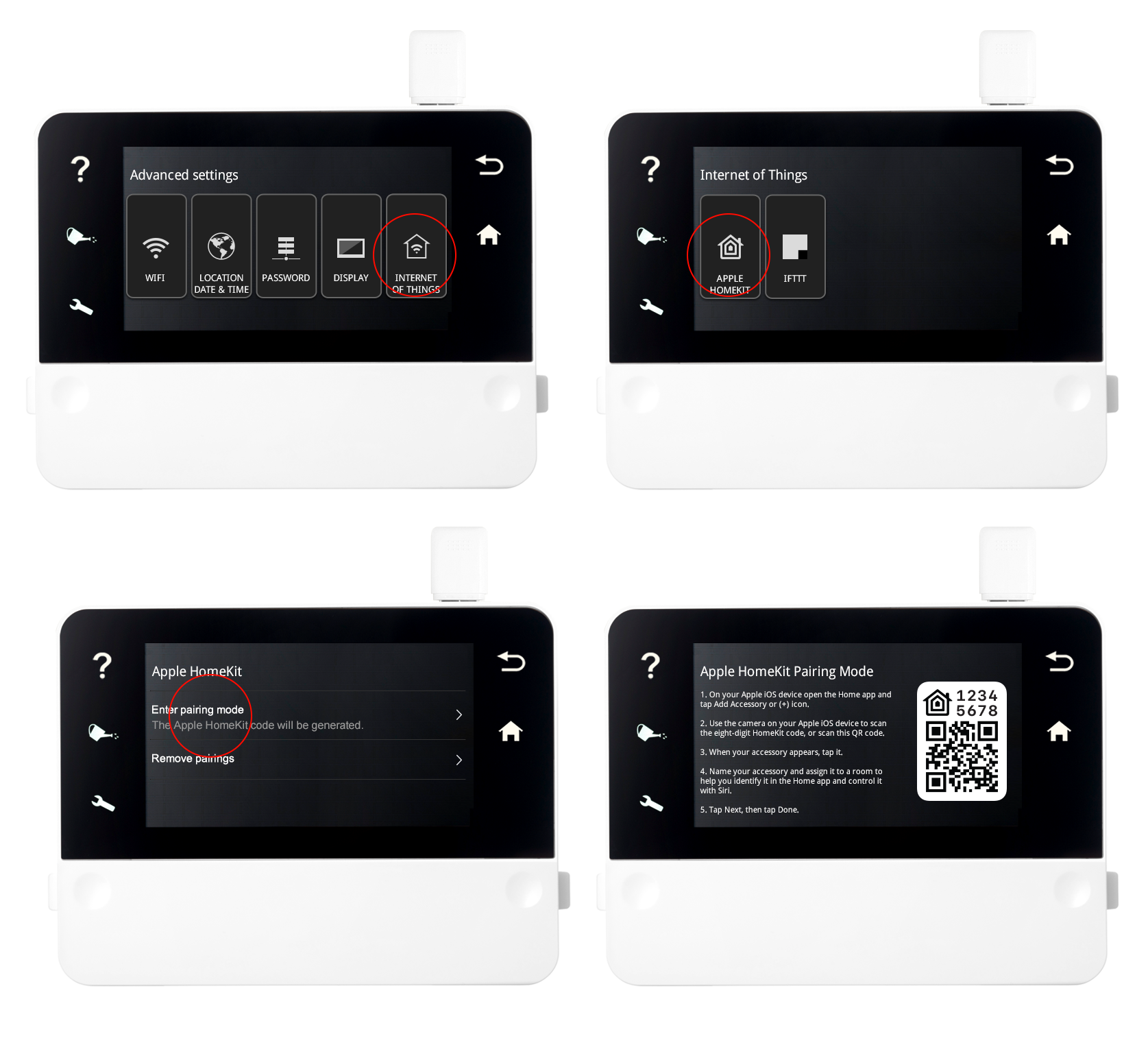
KNOWN ISSUE: The zone names are not transferred from RainMachine to Apple Home app (although they are being sent), this issue is investigated by Apple.
-
I too can not find the Internet of Things in the RainMachine settings>System
The initial post was good to see but directions not very clear. It should say to open the 'Home' app on the iPhone and then on the Rain Machine, navigate to Settings > System > Internet of Things and scan the QR code with the iOS 'Home' app.
-
Hi, Tamer lap, Diver
First, you need to enroll to the Beta Channel and to install the RainMachine Touch HD Beta Firmware on your devices.
We released the new beta firmware (v.4.0.1125) today.
Find out more here.Thank you,
RainMachine Support -

Installed flawlessly as a HomeKit accessory. Thanks for the update!
Initial thoughts;
- easy to set up, works well, and easy to use.
- different from other Homekit integrations (comparing to Hunter Douglas and Homebridge, may be Apple design intent);
* RM programs don't copy over from RM to HomeKit as scenes;
* Zones don't become HomeKit devices, they stay as sub-devices to the RainMachine gateway (extra navigation layer)
* already mentioned as a bug, zone names don't copy into HomeKit;
None of these items are major issues and appreciate the new functionality.
-

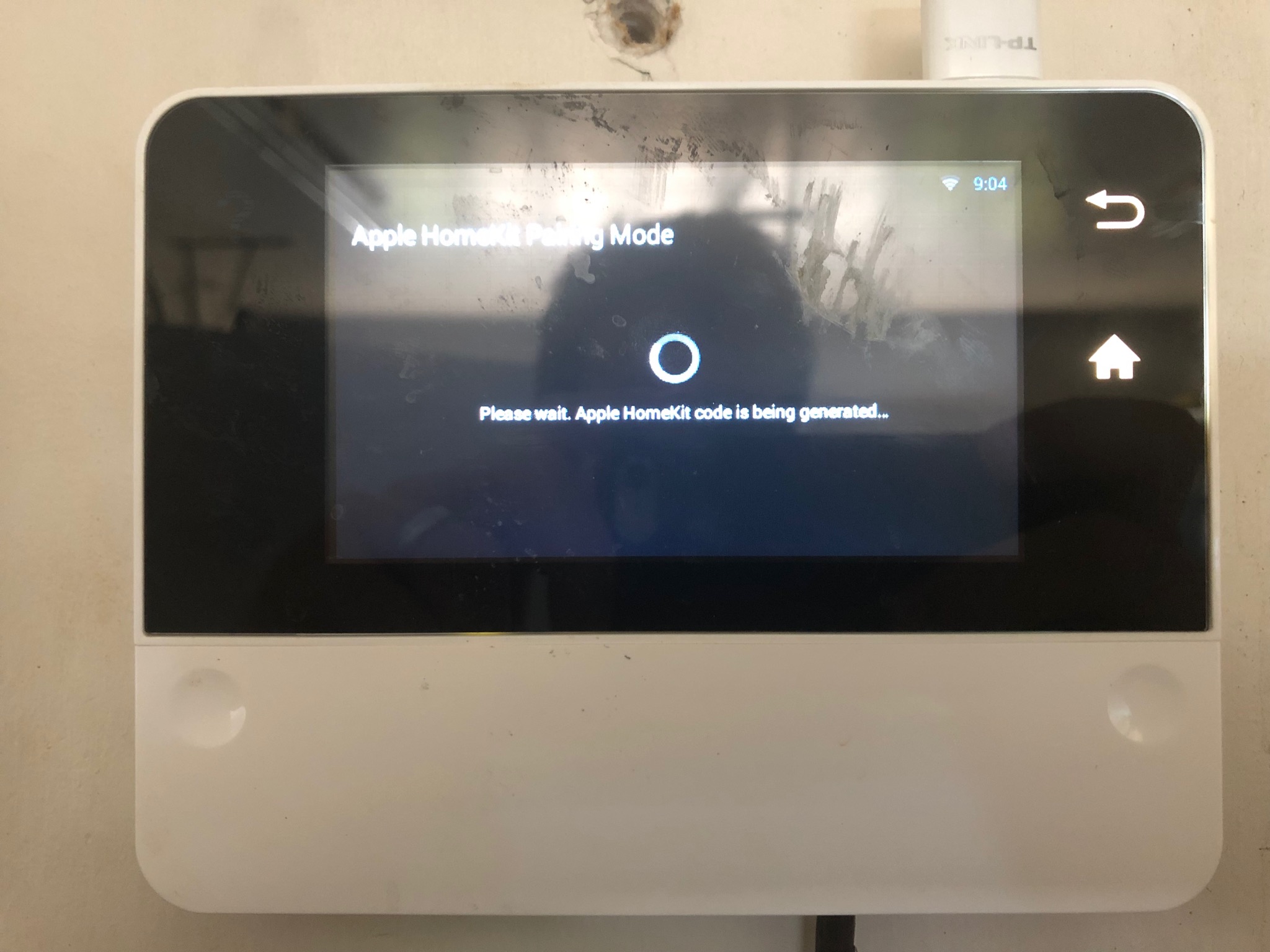
Restarting my phone and the RainMachine did not fix the problem. The RainMachine still never generates a QR Code. I enabled Apple Bonjour support in Settings just in case it is required. Alexa integration is disabled. Pardon my HomeKit ignorance, shouldn't the RainMachine be able to generate a QR code (HomeKit pairing code) without a phone around or on the same WiFi network?
Edit: The only thing that I see in the RainMachine logs is:
2019-07-23 09:30:06,966 - INFO  - rmHomeKit:19 - Homekit removing pairings
2019-07-23 09:30:09,039 - INFO  - rmHomeKit:23 - Homekit entering pairing mode
-
Just a thought Mike. Did you try to "Remove Pairings" if that option is available? Also, have you tried cycling power (versus a restart)? I've had similar issues with my Ecobee thermostats with HomeKit. Another thought if you have not already tried, place your iPhone in "Add Accessory" mode before requesting the QR code from RM. Also make sure that your network isn't blocking any ports or other restrictions.
-
Hi, Mike
It looks like an internet connectivity issue on RainMachine Touch HD device you are using. Can you please do the following from the RainMachine touch interface:
- tap Settings - System - Network Tools
- watch the log for any errors.
You can also try and use another Wi-Fi network just for the code & QR generator.Do you have a RainMachine remote access account validated? Can you access it remotely when you’re away from home?
The Apple HomeKit code and QR generator process does not require an iPhone/iPad, only internet connectivity. The pairing process, of course, will require an Apple device and Apple Home app.
Hope this helps,
Thank you for your patience, MarkJulian
RainMachine Support -
Hi Julian,
Network Tools does not show any problems with the network and internet connection - all green OK (I checked that the before as well) and the WiFi signal strength is -62 dBm. If I am away from home using the cellular network my RainMachine remote access on my iPhone works great. My RainMachine has no problems checking for firmware updates and downloading new weather data so it's not a basic network/DNS issue. The screen timeout is 2 min and the HomeKit code will timeout and the screen turns off and it exits the HomeKit screen.
What happens when you start HomeKit pairing? Is RainMachine using a resource on the internet to generate the QR code? I do not have any outbound internet access restrictions on my home network.
The logs don't show anything after this:
2019-07-24 08:15:56,541 - INFO  - rmHomeKit:19 - Homekit removing pairings
2019-07-24 08:16:11,936 - INFO  - rmHomeKit:19 - Homekit removing pairings
2019-07-24 08:16:14,007 - INFO  - rmHomeKit:23 - Homekit entering pairing mode
2019-07-24 08:16:44,566 - INFO  - rmMainManager:239 - Upgrade checked.
---------------------------- PROGRAM SIMULATION LOG -----------------------------


Please sign in to leave a comment.
Comments
117 comments