How can we help?


Problem connecting to a MikroTik Wifi Router

Comments

17 comments

  • Avatar
    RainMachine Support

    Hi, Felipe
    There are no special requirements.
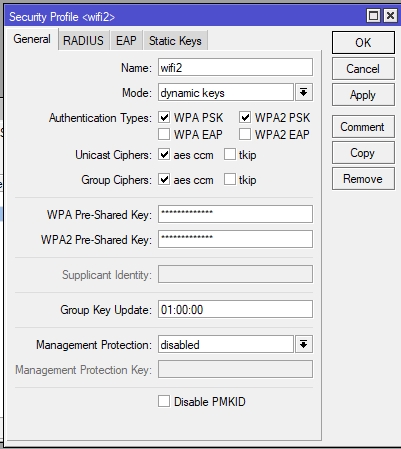
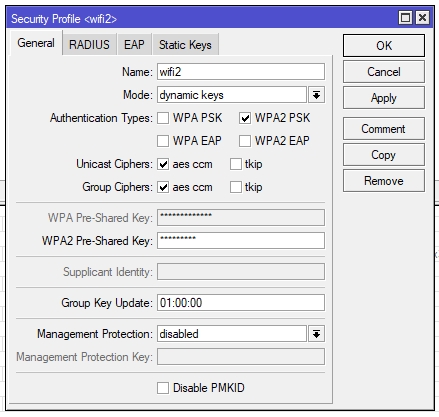
    Would you please try to disable the WPA EAP and WPA2 EAP authentification types and try again.
    Thank you

    Julian
    RainMachine Support

    0
    Comment actions Permalink
  • Avatar
    Felipe Brito

    I have disabled both EAP with no luck. Still does not connect. Not event the logs in the mikrotik registers any activity regarding the MAC Address stated in the app when setup process starts (There is no problem in setting up with Ethernet)


    1
    Comment actions Permalink
  • Avatar
    lanbrown

    Unless you really need WPA, turn it off.  Also, get rid of TKIP as it shouldn't be used with WPA2.  Some vendors support it but the official spec for WPA2 introduced AES to replace TKIP.  So WPA/TKIP are a combination and WPA2/AES is also a combination.  Not all devices support management frame protection and can cause issues.  So try disabling that as well.


    Does the 00:05:00 for the group key update mean 5 minutes?  If so, that would seem to be very low.

    0
    Comment actions Permalink
  • Avatar
    Karsten (Edited )

    I experience the same problem as Felipe:

    • MikroTik set-up
    • Rainmachine (PRO16) connects via ethernet without problems
    • No wifi connection possible; not even logs

    Other smart home devices work without problems.

    I enabled upnp and client-to-client forwarding but no luck so far.

    Would you have any idea with which settings I need to play to get Rainmachine connected via wifi?

    1
    Comment actions Permalink
  • Avatar
    Juraj Šimko

    Hallo, I have same problem with 16 zone pro version and mikrotik wifi (Atheros AR9300). But the security is not, I tried to connect to wifi without a password, unsuccessfully. The device RainMachine will not connect to wifi microtics, no log in mikrotik. Please help me. Thanks.

    0
    Comment actions Permalink
  • Avatar
    Juraj Šimko

    I try to connect RainMachine to other wifi device and the connection was successful. Problem is with mikrotik wifi chipset or something else in wifi settings. I try change some parameters, but unsuccessful.

    0
    Comment actions Permalink
  • Avatar
    RainMachine Nicholas

    Juraj,

    Most likely this is because some settings on Mikrotik, can you post a screenshot of your Access Point settings / Security Settings ?

    0
    Comment actions Permalink
  • Avatar
    Juraj Šimko

    It won't be security, I tried with the password off. Screen below. I tried change a test any wifi setitngs, but unsuccessfully.

    0
    Comment actions Permalink
  • Avatar
    RainMachine Nicholas

    I can't see any issues with your configuration, I would disable WPA PSK and leave only WPA2 and disable WMM.

    0
    Comment actions Permalink
  • Avatar
    Juraj Šimko

    This settings I tried but unsuccessfully. I have not any log in miktorik log memory. I don't have log on the microtic, which is very strange.

    0
    Comment actions Permalink
  • Avatar
    RainMachine Nicholas

    I'm not sure what is actually happening. Are you using Apple iOS or Android selection on Pro screen ? Try Android setup route even if you are on Apple iOS.

    Does the mobile app show the correct name of your AP ? Is the phone connected to the same AP when you are setting up RainMachine ?

    0
    Comment actions Permalink
  • Avatar
    Juraj Šimko

    I have android phone, Apple iOS I have no way to test.

    Yes, my phone is connected to wifi rainmachineXY and show my wifi correctly. I am IT technician, I try many options.

    I test connect Rainmachine to wifi on other device (Huawei) and connection was successfully, foreign mistake I have nowhere to do. 

    Please try to connect rainmachine to mikrotik wifi, if you have a microtic available.

    0
    Comment actions Permalink
  • Avatar
    RainMachine Nicholas

    Try to set a certain frequency instead of Auto. Other than that only AES/TKIP settings might have any influence.

    0
    Comment actions Permalink
  • Avatar
    lanbrown

    WPA is tied to TKIP

    WPA2 is tied to AES

    Some manufacturers allow you to use WPA2 with TKIP; but that is out of spec.

    Also, don't use 40Mhz channels in the 2.4GHz band.  Typically it causes more issues than providing more speed.

    0
    Comment actions Permalink
  • Avatar
    Juraj Šimko

    Your advice didn't help, it still doesn't work.

    0
    Comment actions Permalink
  • Avatar
    RainMachine Nicholas

    Pretty much out of ideas. I would try both aes/ccm + tkip for a change.

    0
    Comment actions Permalink
  • Avatar
    Juraj Šimko

    I repeat once again that even when I turn off the security, it doesn't work. Foreign with WPA, TKIP has nothing to do with it.

    I connected it via LAN and I won't solve it anymore, but you should simulate it in development and fix it then fix the repair update and fix it.

    0
    Comment actions Permalink

Please sign in to leave a comment.